Learn languages from films, books, and shows with Lingosive
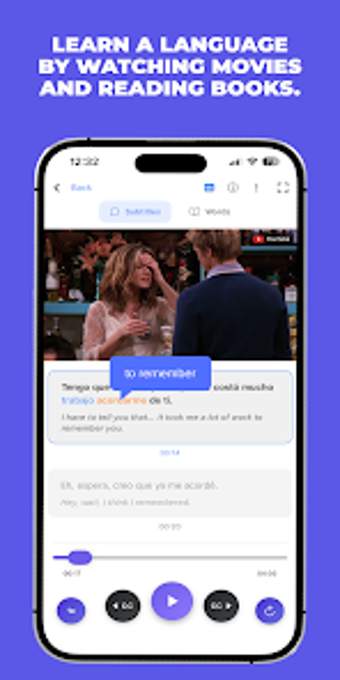
Lingosive - Watch and Learn, developed by Lingosive, turns film and series viewing into structured language practice for learners who prefer immersion. The app ties media playback to learning by exposing users to authentic sentences while offering instant translations and AI explanations for tricky words. It highlights vocabulary progress with color-coded tracking and daily growth prompts. The tool suits self-directed learners and viewers of international movies, series, and podcasts seeking contextual vocabulary and listening practice.
What is Lingosive useful for?
Lingosive targets media-driven acquisition, letting learners extract language input from movies, series, and books. The app connects to major streaming platforms including YouTube, Netflix, HBO Max, Disney+, and Prime Video, and draws on a vast content base of over 400,000 videos and 15,000 books. Its context engine indexes more than 50 million real-world scenes, making it a tool for studying words in natural, varied situations rather than isolated sentences.
How does Lingosive teach vocabulary through real media?
The learning path emphasizes exposure plus quick reference: the app shows dual-language subtitles and lets users click any subtitle word for an instant translation and definition. An AI layer adds context-aware explanations, synonyms, and usage notes so learners see why a word fits a particular scene. That combination turns passive viewing into repeated, contextualized encounters with target vocabulary, aligning with incidental-learning strategies used by many language learners.
Who benefits from this media-first approach?
The product is aimed at language learners of all levels who already watch international content and want to convert that activity into study. It is particularly appropriate for motivated self-learners and independent study, since the design centers on individual viewing sessions and personalised discovery. The app does not present a described teacher-facing assignment or grading workflow, so structured classroom administration is not the primary use case.
How does the app show progress and personalise reviews?
Progress is visual and adaptive through a smart color scheme that marks words as learning, known, or recommended using blue, green, and orange highlights. Daily smart growth notifications surface essential vocabulary matched to the user’s level, and cross-platform synchronization keeps saved words and scene history aligned across Android, iOS, desktop, and the Chrome extension. These elements support incremental review habits across devices for ongoing practice.
A dependable media-based option for committed, self-directed learners
Community feedback highlights the tool’s stability and the depth of its AI translation features, which supports its educational credibility. For learners who convert watching into deliberate study, the app provides consistent media-based practice and steady improvement. A practical caveat: measurable gains depend on regular, focused engagement with chosen content rather than brief or sporadic playback, so disciplined study habits remain essential for meaningful progress.